Commit f9129170482 for woocommerce
commit f9129170482b5d6aa315d0e9733c4351a543ba0d
Author: Brian Coords <bacoords@gmail.com>
Date: Tue Jul 7 10:27:30 2026 -0700
Reorganize developer documentation sections (#66174)
* Reorganize feature docs by product and order areas
* Consolidate theme design guidelines
* Order feature docs sidebar entries
* Move localization docs into contributing guide
* Update docs category index metadata
diff --git a/docs/apis/store-api/resources-endpoints/_category_.json b/docs/apis/store-api/resources-endpoints/_category_.json
index 3df4019c63c..375f2087bc8 100644
--- a/docs/apis/store-api/resources-endpoints/_category_.json
+++ b/docs/apis/store-api/resources-endpoints/_category_.json
@@ -2,6 +2,7 @@
"label": "Resources and Endpoints",
"link": {
"type": "generated-index",
- "title": "Resources and Endpoints"
+ "title": "Resources and Endpoints",
+ "slug": "/apis/store-api/resources-endpoints"
}
-}
\ No newline at end of file
+}
diff --git a/docs/best-practices/_category_.json b/docs/best-practices/_category_.json
index 2e34a93de1c..4a44cdca31e 100644
--- a/docs/best-practices/_category_.json
+++ b/docs/best-practices/_category_.json
@@ -1,4 +1,4 @@
{
"position": 5,
"label": "Best practices"
-}
\ No newline at end of file
+}
diff --git a/docs/best-practices/data-management/_category_.json b/docs/best-practices/data-management/_category_.json
index 2cd0b50af89..72f3c5cfbbe 100644
--- a/docs/best-practices/data-management/_category_.json
+++ b/docs/best-practices/data-management/_category_.json
@@ -1,4 +1,9 @@
{
"position": 5,
- "label": "Data management"
-}
\ No newline at end of file
+ "label": "Data management",
+ "link": {
+ "type": "generated-index",
+ "title": "Data management",
+ "slug": "/best-practices/data-management"
+ }
+}
diff --git a/docs/best-practices/data-management/data-stores.md b/docs/best-practices/data-management/data-stores.md
index 531cdd02180..6f4c0088599 100644
--- a/docs/best-practices/data-management/data-stores.md
+++ b/docs/best-practices/data-management/data-stores.md
@@ -1,7 +1,7 @@
---
post_title: How to manage WooCommerce Data Stores
sidebar_label: Manage data stores
-
+description: A guide to managing WooCommerce data stores, including creating new data stores, replacing core data stores, and calling data stores from your own code.
---
# How to manage WooCommerce Data Stores
diff --git a/docs/best-practices/localization-translation/_category_.json b/docs/best-practices/localization-translation/_category_.json
deleted file mode 100644
index 091b241d7a5..00000000000
--- a/docs/best-practices/localization-translation/_category_.json
+++ /dev/null
@@ -1,4 +0,0 @@
-{
- "position": 4,
- "label": "Localization and translation"
-}
\ No newline at end of file
diff --git a/docs/best-practices/localization-translation/countries-and-subdivisions.md b/docs/best-practices/localization-translation/countries-and-subdivisions.md
deleted file mode 100644
index d4a2726e804..00000000000
--- a/docs/best-practices/localization-translation/countries-and-subdivisions.md
+++ /dev/null
@@ -1,17 +0,0 @@
----
-post_title: Updating countries and subdivisions
-sidebar_label: Countries and subdivisions
-
----
-
-# Updating countries and subdivisions
-
-WooCommerce comes complete with a comprehensive list of countries and subdivisions (such as provinces or states) that are used in various parts of the user interface.
-
-Of course, even countries and their subdivisions periodically change. In these cases, you can certainly file a [bug report](https://github.com/woocommerce/woocommerce/issues/new?template=1-bug-report.yml) or [submit a pull request](/docs/contribution/contributing). However, it is important to understand that our policy is only to accept changes if they align with the current version of the [CLDR project](https://cldr.unicode.org/). Therefore, it is generally best to review that and, if necessary, propose a change there first before asking that it be adopted by WooCommerce.
-
-This approach may not be suitable in all cases, because it can take time for CLDR to accept updates. In such cases, you can still modify the lists of countries and subdivisions by using custom snippets like the following:
-
-- [Snippet to add a country](/docs/code-snippets/add-a-country)
-- [Snippet to add or modify states](/docs/code-snippets/add-or-modify-states)
-
diff --git a/docs/best-practices/localization-translation/translating-woocommerce.md b/docs/best-practices/localization-translation/translating-woocommerce.md
deleted file mode 100644
index a61b9d3dfdd..00000000000
--- a/docs/best-practices/localization-translation/translating-woocommerce.md
+++ /dev/null
@@ -1,162 +0,0 @@
----
-post_title: How to translate WooCommerce
-sidebar_label: Translating WooCommerce
-
----
-
-# How to translate WooCommerce
-
-WooCommerce is already translated into several languages and is translation-ready right out of the box. All that's needed is a translation file for your language.
-
-There are several methods to create a translation, most of which are outlined in the WordPress Codex. In most cases you can contribute to the project on [https://translate.wordpress.org/projects/wp-plugins/woocommerce/](https://translate.wordpress.org/projects/wp-plugins/woocommerce/).
-
-To create custom translations you can consider using [Poedit](https://poedit.net/).
-
-## Set up WordPress in your language
-
-To set your WordPress site's language:
-
-1. Go to `WP Admin > Settings > General` and adjust the `Site Language`.
-2. Go to `WP Admin > Dashboard > Updates` and click the `Update Translations` button.
-
-Once this has been done, the shop displays in your locale if the language file exists. Otherwise, you need to create the language files (process explained below).
-
-## Contributing your localization to core
-
-We encourage contributions to our translations. If you want to add translated strings or start a new translation, simply register at WordPress.org and submit your translations to [https://translate.wordpress.org/projects/wp-plugins/woocommerce/](https://translate.wordpress.org/projects/wp-plugins/woocommerce/) for approval.
-
-## Translating WooCommerce into your language
-
-Both stable and development versions of WooCommerce are available for translation. When you install or update WooCommerce, WordPress will automatically fetch a 100% complete translation for your language. If such a translation isn't available, you can either download it manually or contribute to complete the translation, benefiting all users.
-
-If you're new to translating, check out the [translators handbook](https://make.wordpress.org/polyglots/handbook/tools/glotpress-translate-wordpress-org/) to get started.
-
-### Downloading translations from translate.wordpress.org manually
-
-1. Go to [translate.wordpress.org](https://translate.wordpress.org/projects/wp-plugins/woocommerce) and look for your language in the list.
-2. Click the title to be taken to the section for that language.
-
- 
-
-3. Click the heading under `Set/Sub Project` to view and download a Stable version.
-
- 
-
-4. Scroll to the bottom for export options. Export a `.mo` file for use on your site.
-
-5. Rename this file to `woocommerce-YOURLANG.mo` (e.g., Great Britain English should be `en_GB`). The corresponding language code can be found by going to [https://translate.wordpress.org/projects/wp-plugins/woocommerce/](https://translate.wordpress.org/projects/wp-plugins/woocommerce/) and opening the desired language. The language code is visible in the upper-right corner.
-
- 
-
-6. Upload to your site under `wp-content/languages/woocommerce/`. Once uploaded, this translation file may be used.
-
-## Creating custom translations
-
-WooCommerce includes a language file (`.pot` file) that contains all of the English text. You can find this language file inside the plugin folder in `woocommerce/i18n/languages/`.
-
-## Creating custom translations with PoEdit
-
-WooCommerce comes with a `.pot` file that can be imported into PoEdit to translate.
-
-To get started:
-
-1. Open PoEdit and select `Create new translation from POT template`.
-2. Choose `woocommerce.pot` and PoEdit will show the catalog properties window.
-
- 
-
-3. Enter your name and details, so other translators know who you are, and click `OK`.
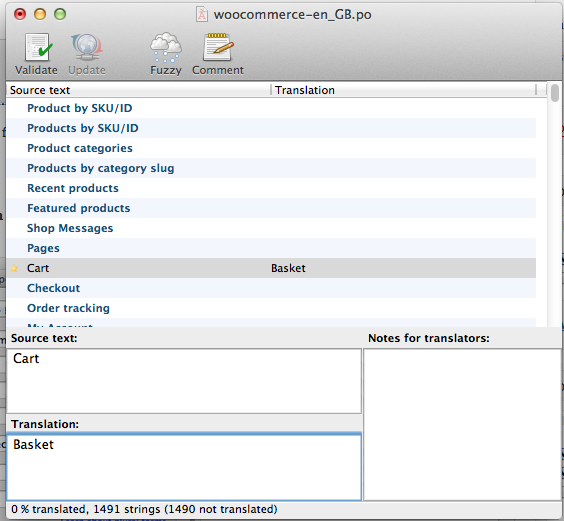
-4. Save your `.po` file. Name it based on what you are translating to, i.e., a GB translation is saved as `woocommerce-en_GB.po`. Now the strings are listed.
-
- 
-
-5. Save after translating strings. The `.mo` file is generated automatically.
-6. Update your `.po` file by opening it and then go to `Catalog > Update from POT file`.
-7. Choose the file and it will be updated accordingly.
-
-## Making your translation upgrade safe
-
-WooCommerce keeps translations in `wp-content/languages/plugins`, like all other plugins. But if you wish to include a custom translation, you can use the directory `wp-content/languages/woocommerce`, or you can use a snippet to load a custom translation stored elsewhere:
-
-```php
-// Code to be placed in functions.php of your theme or a custom plugin file.
-add_filter( 'load_textdomain_mofile', 'load_custom_plugin_translation_file', 10, 2 );
-
-/**
- * Replace 'textdomain' with your plugin's textdomain. e.g. 'woocommerce'.
- * File to be named, for example, yourtranslationfile-en_GB.mo
- * File to be placed, for example, wp-content/languages/textdomain/yourtranslationfile-en_GB.mo
- */
-function load_custom_plugin_translation_file( $mofile, $domain ) {
- if ( 'textdomain' === $domain ) {
- $mofile = WP_LANG_DIR . '/textdomain/yourtranslationfile-' . get_locale() . '.mo';
- }
-
- return $mofile;
-}
-```
-
-## Other tools
-
-There are some other third-party tools that can help with translations. The following list shows a few of them.
-
-### Loco Translate
-
-[Loco Translate](https://wordpress.org/plugins/loco-translate/) provides in-browser editing of WordPress translation files and integration with automatic translation services.
-
-### Say what?
-
-[Say what?](https://wordpress.org/plugins/say-what/) allows to effortlessly translate or modify specific words without delving into a WordPress theme's `.po` file.
-
-### String locator
-
-[String Locator](https://wordpress.org/plugins/string-locator/) enables quick searches within themes, plugins, or the WordPress core, displaying a list of files with the matching text and its line number.
-
-## FAQ
-
-### Why some strings on the Checkout page are not being translated?
-
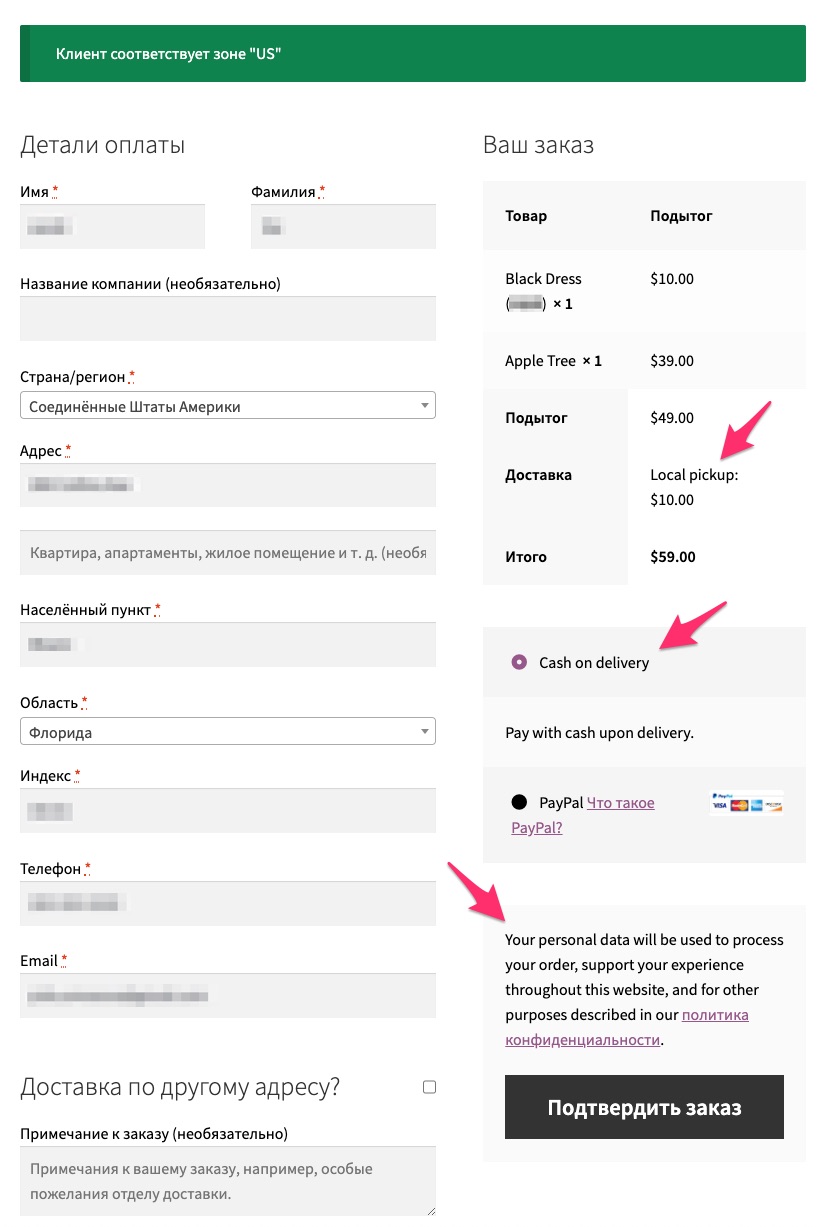
-You may see that some of the strings are not being translated on the Checkout page. For example, in the screenshot below, `Local pickup` shipping method, `Cash on delivery` payment method and a message related to Privacy Policy are not being translated to Russian while the rest of the form is indeed translated:
-
-
-
-This usually happens when you first install WooCommerce and select default site language (English) and later change the site language to another one. In WooCommerce, the strings that have not been translated in the screenshot, are stored in the database after the initial WooCommerce installation. Therefore, if the site language is changed to another one, there is no way for WooCommerce to detect a translatable string since these are database entries.
-
-In order to fix it, navigate to WooCommerce settings corresponding to the string you need to change and update the translation there directly. For example, to fix the strings in our case above, you would need to do the following:
-
-**Local pickup**:
-
-1. Go to `WooCommerce > Settings > Shipping > Shipping Zones`.
-2. Select the shipping zone where "Local pickup" is listed.
-3. Open "Local pickup" settings.
-4. Rename the method using your translation.
-5. Save the setting.
-
-**Cash on delivery**:
-
-1. Go to `WooCommerce > Settings > Payments`.
-2. Select the "Cash on delivery" payment method.
-3. Open its settings.
-4. Rename the method title, description, and instructions using your translation.
-5. Save the setting.
-
-**Privacy policy message**:
-
-1. Go to `WooCommerce > Settings > Accounts & Privacy`.
-2. Scroll to the "Privacy policy" section.
-3. Edit both the `Registration privacy policy` and `Checkout privacy policy` fields with your translation.
-4. Save the settings.
-
-Navigate back to the Checkout page - translations should be reflected there.
-
-### I have translated the strings I needed, but some of them don't show up translated on the front end. Why?
-
-If some of your translated strings don't show up as expected on your WooCommerce site, the first thing to check is if these strings have both a Single and Plural form in the Source text section. To do so, open the corresponding translation on [https://translate.wordpress.org/projects/wp-plugins/woocommerce/](https://translate.wordpress.org/projects/wp-plugins/woocommerce/), e.g. [the translation for Product and Products](https://translate.wordpress.org/projects/wp-plugins/woocommerce/stable/de/default/?filters%5Bstatus%5D=either&filters%5Boriginal_id%5D=577764&filters%5Btranslation_id%5D=24210880).
-
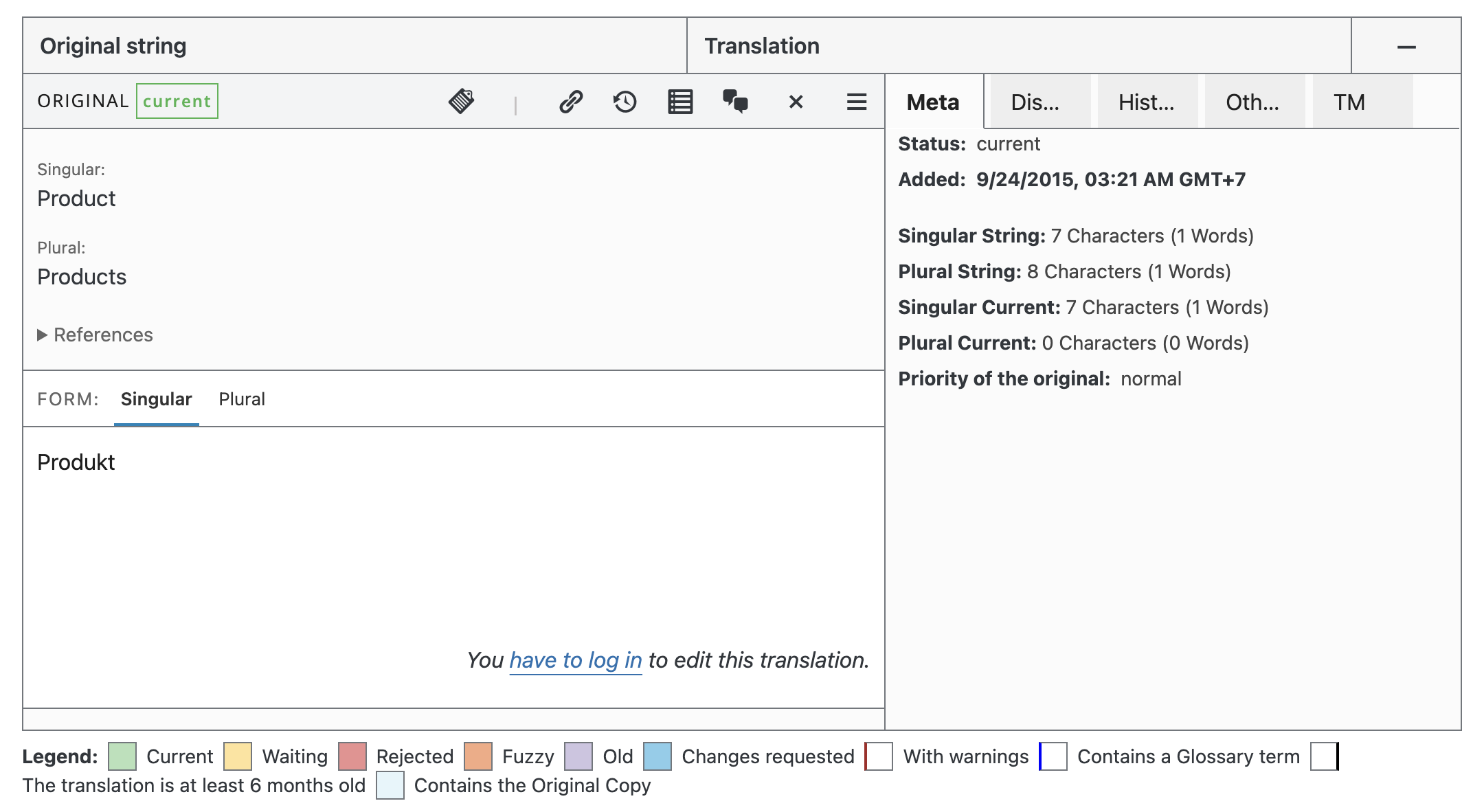
-This screenshot shows that the Singular translation is available:
-
-
-
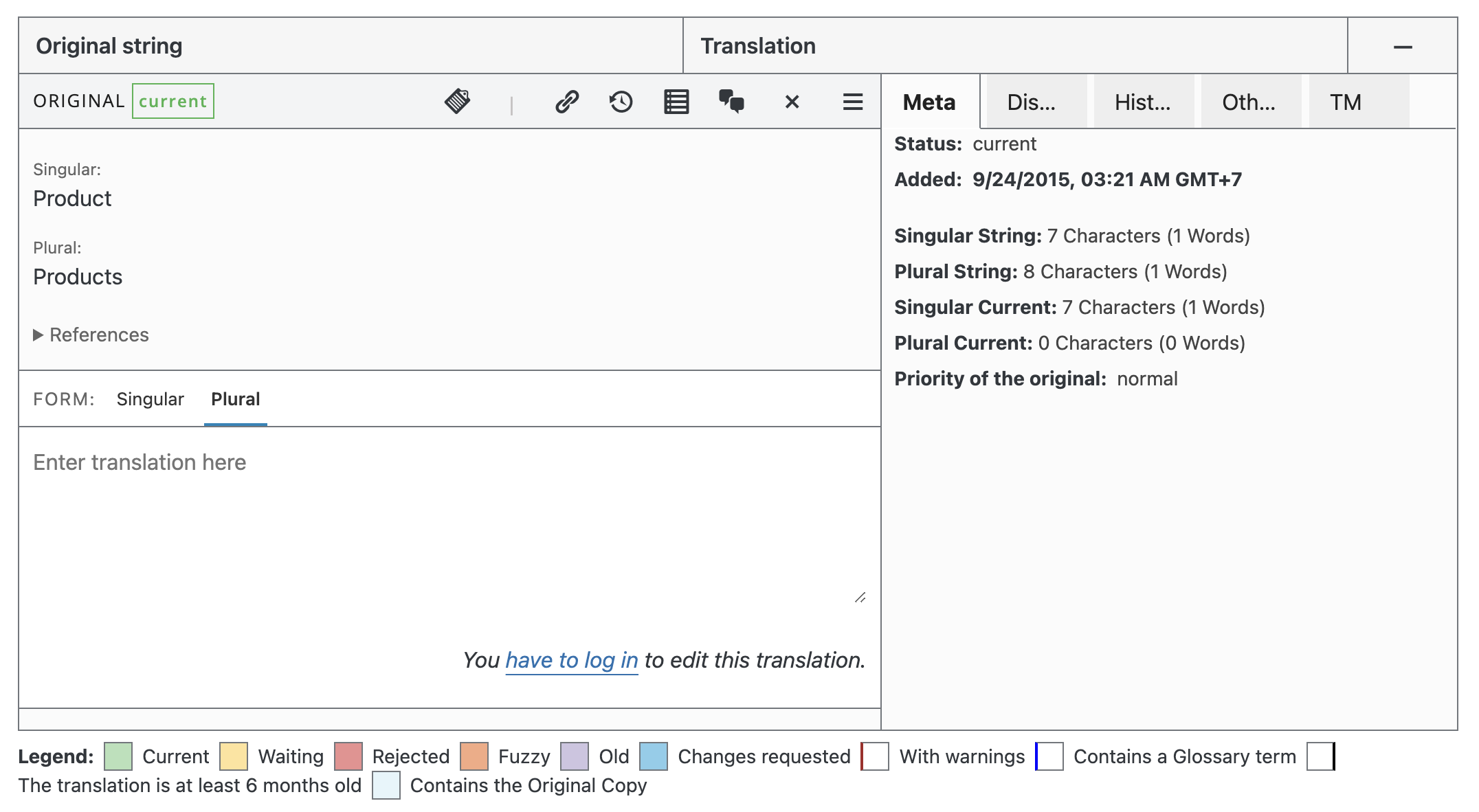
-While this screenshot shows that the Plural translation is not available:
-
-
diff --git a/docs/best-practices/performance/_category_.json b/docs/best-practices/performance/_category_.json
index fd73bd86c45..1ba14dcc5cf 100644
--- a/docs/best-practices/performance/_category_.json
+++ b/docs/best-practices/performance/_category_.json
@@ -1,4 +1,9 @@
{
"position": 2,
- "label": "Performance"
-}
\ No newline at end of file
+ "label": "Performance",
+ "link": {
+ "type": "generated-index",
+ "title": "Performance",
+ "slug": "/best-practices/performance"
+ }
+}
diff --git a/docs/best-practices/performance/configuring-caching-plugins.md b/docs/best-practices/performance/configuring-caching-plugins.md
index 18be0e72c83..6b192947e92 100644
--- a/docs/best-practices/performance/configuring-caching-plugins.md
+++ b/docs/best-practices/performance/configuring-caching-plugins.md
@@ -1,7 +1,7 @@
---
post_title: How to configure caching plugins for WooCommerce
sidebar_label: Configure caching plugins
-
+description: A guide to configuring caching plugins for WooCommerce to ensure proper functionality and performance.
---
# How to configure caching plugins for WooCommerce
diff --git a/docs/best-practices/performance/performance-best-practices.md b/docs/best-practices/performance/performance-best-practices.md
index 0197d5a5af6..d19c62d286e 100644
--- a/docs/best-practices/performance/performance-best-practices.md
+++ b/docs/best-practices/performance/performance-best-practices.md
@@ -1,7 +1,7 @@
---
post_title: WooCommerce performance best practices
sidebar_label: Performance best practices
-
+description: Best practices for optimizing the performance of WooCommerce stores and extensions.
---
# Performance best practices for WooCommerce extensions
diff --git a/docs/best-practices/performance/performance-optimization.md b/docs/best-practices/performance/performance-optimization.md
index 4829aba4481..8ef76fbd862 100644
--- a/docs/best-practices/performance/performance-optimization.md
+++ b/docs/best-practices/performance/performance-optimization.md
@@ -1,7 +1,7 @@
---
post_title: How to optimize performance for WooCommerce stores
sidebar_label: Optimize store performance
-
+description: Best practices and techniques for optimizing the performance of WooCommerce stores, including caching, image optimization, database maintenance, code minification, and the use of Content Delivery Networks (CDNs).
---
# How to optimize performance for WooCommerce stores
diff --git a/docs/best-practices/security/_category_.json b/docs/best-practices/security/_category_.json
index cc15ac709cd..ecd069484c0 100644
--- a/docs/best-practices/security/_category_.json
+++ b/docs/best-practices/security/_category_.json
@@ -1,4 +1,9 @@
{
"position": 3,
- "label": "Security"
-}
\ No newline at end of file
+ "label": "Security",
+ "link": {
+ "type": "generated-index",
+ "title": "Security",
+ "slug": "/best-practices/security"
+ }
+}
diff --git a/docs/best-practices/urls-and-routing/_category_.json b/docs/best-practices/urls-and-routing/_category_.json
index 79ca86a5872..a22d9b13474 100644
--- a/docs/best-practices/urls-and-routing/_category_.json
+++ b/docs/best-practices/urls-and-routing/_category_.json
@@ -1,4 +1,9 @@
{
"position": 6,
- "label": "URLs and routing"
-}
\ No newline at end of file
+ "label": "URLs and routing",
+ "link": {
+ "type": "generated-index",
+ "title": "URLs and routing",
+ "slug": "/best-practices/urls-and-routing"
+ }
+}
diff --git a/docs/best-practices/urls-and-routing/customizing-endpoint-urls.md b/docs/best-practices/urls-and-routing/customizing-endpoint-urls.md
index 315dd9a6178..539685715d1 100644
--- a/docs/best-practices/urls-and-routing/customizing-endpoint-urls.md
+++ b/docs/best-practices/urls-and-routing/customizing-endpoint-urls.md
@@ -1,7 +1,7 @@
---
post_title: Customizing WooCommerce endpoint URLs
sidebar_label: Customizing endpoint URLs
-
+description: A guide to customizing WooCommerce endpoint URLs, including how to change them in settings, use them in menus, and troubleshoot common issues.
---
# Customizing WooCommerce endpoint URLs
diff --git a/docs/best-practices/urls-and-routing/removing-product-product-category-or-shop-from-the-url.md b/docs/best-practices/urls-and-routing/removing-product-product-category-or-shop-from-the-url.md
index e98cdd0c35e..cc30c57c07a 100644
--- a/docs/best-practices/urls-and-routing/removing-product-product-category-or-shop-from-the-url.md
+++ b/docs/best-practices/urls-and-routing/removing-product-product-category-or-shop-from-the-url.md
@@ -1,7 +1,7 @@
---
post_title: Understanding the risks of removing URL bases in WooCommerce
sidebar_label: Risks of removing URL bases
-
+description: An explanation of the risks and potential issues associated with removing `/product/`, `/product-category/`, or `/shop/` from WooCommerce URLs, including performance and SEO concerns.
---
# Understanding the risks of removing URL bases in WooCommerce
diff --git a/docs/best-practices/urls-and-routing/webhooks.md b/docs/best-practices/urls-and-routing/webhooks.md
index 557b02b4bad..9753e5d2fc4 100644
--- a/docs/best-practices/urls-and-routing/webhooks.md
+++ b/docs/best-practices/urls-and-routing/webhooks.md
@@ -1,6 +1,7 @@
---
post_title: Working with webhooks in WooCommerce
sidebar_label: Using webhooks
+description: A guide to working with webhooks in WooCommerce, including creating, editing, deleting, and logging webhook events for integration with third-party services.
---
# Working with webhooks in WooCommerce
diff --git a/docs/code-snippets/useful-functions.md b/docs/code-snippets/useful-functions.md
index d6c6073fd60..9ad54b82017 100644
--- a/docs/code-snippets/useful-functions.md
+++ b/docs/code-snippets/useful-functions.md
@@ -147,7 +147,7 @@ This function is the standard way of retrieving orders based on certain paramete
wc_get_orders( $args )
```
-[Arguments and usage](/docs/extensions/core-concepts/wc-get-orders/)
+[Arguments and usage](/docs/features/orders/wc-get-orders/)
### wc_get_order
@@ -203,7 +203,7 @@ This function is the standard way of retrieving products based on certain parame
wc_get_products( $args )
```
-[Arguments and usage](/docs/extensions/core-concepts/wc-get-products/)
+[Arguments and usage](/docs/features/products/wc-get-products/)
### wc_get_product
diff --git a/docs/contribution/contributing/string-localisation-guidelines.md b/docs/contribution/contributing/string-localisation-guidelines.md
index aee42cb3101..5f3f3480f88 100644
--- a/docs/contribution/contributing/string-localisation-guidelines.md
+++ b/docs/contribution/contributing/string-localisation-guidelines.md
@@ -1,14 +1,172 @@
---
-post_title: String localization guidelines
-sidebar_label: String localization guidelines
-
+post_title: String localization
+sidebar_label: String localization
---
-# String localization guidelines
+# String localization
+
+WooCommerce is translation-ready out of the box. This page covers how to write localizable strings, contribute translations, create custom translations, and update locale-specific data such as countries and subdivisions.
+
+## Translating WooCommerce
+
+WooCommerce is already translated into several languages and only needs a translation file for your language. In most cases, you can contribute translations on [translate.wordpress.org](https://translate.wordpress.org/projects/wp-plugins/woocommerce/).
+
+To create custom translations, you can also use a tool such as [Poedit](https://poedit.net/).
+
+### Set up WordPress in your language
+
+To set your WordPress site's language:
+
+1. Go to `WP Admin > Settings > General` and adjust the `Site Language`.
+2. Go to `WP Admin > Dashboard > Updates` and click the `Update Translations` button.
+
+Once this has been done, the shop displays in your locale if the language file exists. Otherwise, you need to create the language files.
+
+### Writing localizable strings
+
+1. Use the `woocommerce` textdomain in all strings.
+2. When using dynamic strings in `printf()` or `sprintf()`, use numbered arguments if you are replacing more than one string. For example, `Test %s string %s.` should be `Test %1$s string %2$s.`
+3. Use sentence case. For example, `Some Thing` should be `Some thing`.
+4. Avoid HTML. If needed, insert the HTML using `sprintf()`.
+
+For more information, see the WordPress core documentation for [i18n for WordPress Developers](https://codex.wordpress.org/I18n_for_WordPress_Developers).
+
+### Contribute translations to core
+
+We encourage contributions to our translations. If you want to add translated strings or start a new translation, register at WordPress.org and submit your translations to [translate.wordpress.org](https://translate.wordpress.org/projects/wp-plugins/woocommerce/) for approval.
+
+Both stable and development versions of WooCommerce are available for translation. When you install or update WooCommerce, WordPress will automatically fetch a 100% complete translation for your language. If such a translation isn't available, you can download it manually or contribute to complete the translation, benefiting all users.
+
+If you're new to translating, check out the [Translators Handbook](https://make.wordpress.org/polyglots/handbook/tools/glotpress-translate-wordpress-org/) to get started.
+
+### Download translations manually
+
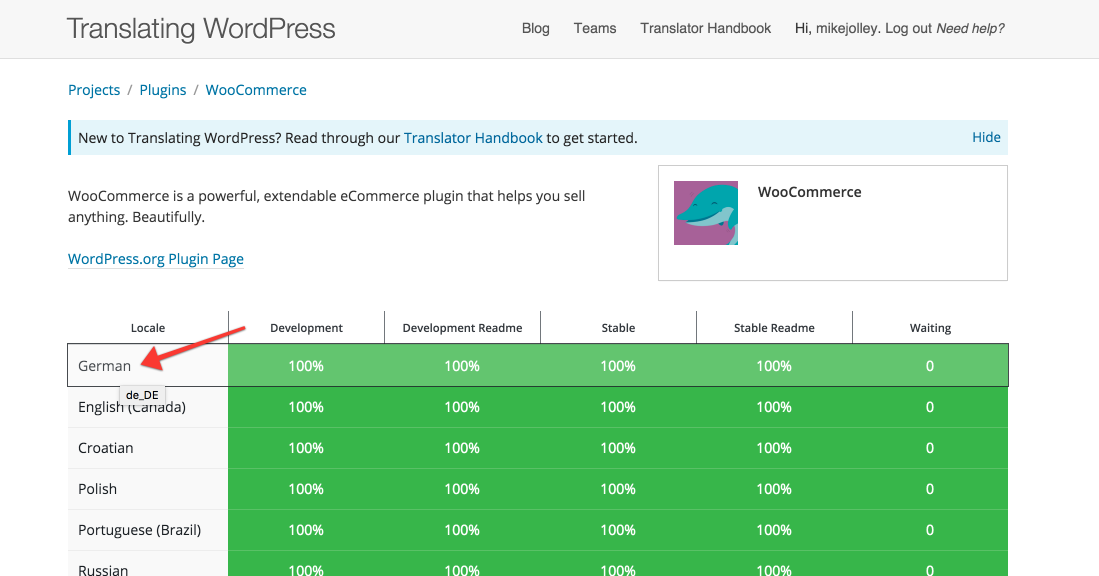
+1. Go to [translate.wordpress.org](https://translate.wordpress.org/projects/wp-plugins/woocommerce) and look for your language in the list.
+2. Click the title to be taken to the section for that language.
+
+ 
+
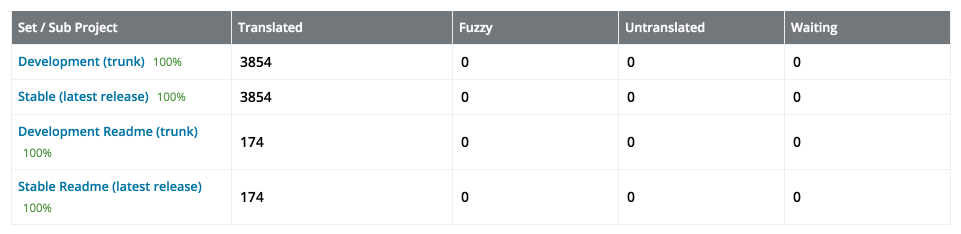
+3. Click the heading under `Set/Sub Project` to view and download a Stable version.
+
+ 
+
+4. Scroll to the bottom for export options. Export a `.mo` file for use on your site.
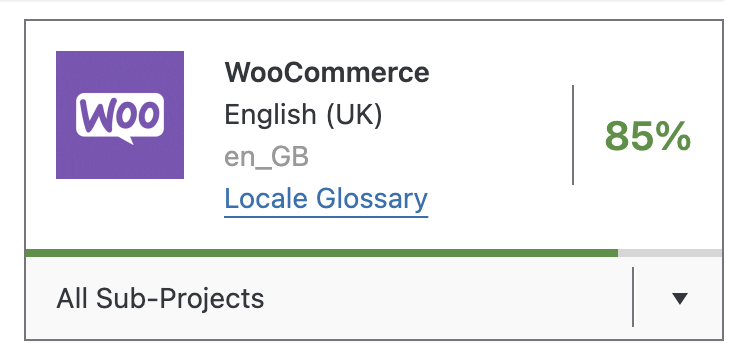
+5. Rename this file to `woocommerce-YOURLANG.mo`. For example, Great Britain English should be `woocommerce-en_GB.mo`. The corresponding language code can be found by opening the desired language on [translate.wordpress.org](https://translate.wordpress.org/projects/wp-plugins/woocommerce/). The language code is visible in the upper-right corner.
+
+ 
+
+6. Upload the file to your site under `wp-content/languages/woocommerce/`. Once uploaded, this translation file may be used.
+
+## Creating custom translations
+
+WooCommerce includes a language file (`.pot` file) that contains all of the English text. You can find this language file inside the plugin folder in `woocommerce/i18n/languages/`.
+
+### Create custom translations with Poedit
+
+WooCommerce comes with a `.pot` file that can be imported into Poedit to translate.
+
+To get started:
+
+1. Open Poedit and select `Create new translation from POT template`.
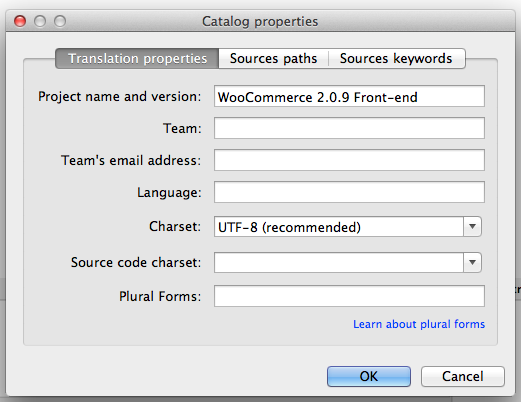
+2. Choose `woocommerce.pot` and Poedit will show the catalog properties window.
+
+ 
+
+3. Enter your name and details, so other translators know who you are, and click `OK`.
+4. Save your `.po` file. Name it based on what you are translating to, such as `woocommerce-en_GB.po` for a Great Britain English translation. Now the strings are listed.
+
+ 
+
+5. Save after translating strings. The `.mo` file is generated automatically.
+6. Update your `.po` file by opening it and then going to `Catalog > Update from POT file`.
+7. Choose the file and it will be updated accordingly.
+
+### Make custom translations upgrade safe
+
+WooCommerce keeps translations in `wp-content/languages/plugins`, like all other plugins. If you wish to include a custom translation, you can use the directory `wp-content/languages/woocommerce`, or you can use a snippet to load a custom translation stored elsewhere:
+
+```php
+// Code to be placed in functions.php of your theme or a custom plugin file.
+add_filter( 'load_textdomain_mofile', 'load_custom_plugin_translation_file', 10, 2 );
+
+/**
+ * Replace 'textdomain' with your plugin's textdomain. e.g. 'woocommerce'.
+ * File to be named, for example, yourtranslationfile-en_GB.mo
+ * File to be placed, for example, wp-content/languages/textdomain/yourtranslationfile-en_GB.mo
+ */
+function load_custom_plugin_translation_file( $mofile, $domain ) {
+ if ( 'textdomain' === $domain ) {
+ $mofile = WP_LANG_DIR . '/textdomain/yourtranslationfile-' . get_locale() . '.mo';
+ }
+
+ return $mofile;
+}
+```
+
+## Translation tools
+
+Some third-party tools can help with translations:
+
+- [Loco Translate](https://wordpress.org/plugins/loco-translate/) provides in-browser editing of WordPress translation files and integration with automatic translation services.
+- [Say what?](https://wordpress.org/plugins/say-what/) allows you to translate or modify specific words without editing a WordPress theme's `.po` file.
+- [String Locator](https://wordpress.org/plugins/string-locator/) enables quick searches within themes, plugins, or WordPress core, displaying a list of files with the matching text and its line number.
+
+## FAQ
+
+### Why are some Checkout page strings not being translated?
+
+You may see that some Checkout page strings are not translated. For example, the `Local pickup` shipping method, `Cash on delivery` payment method, or a Privacy Policy message may remain in English while the rest of the form is translated:
+
+
+
+This usually happens when you first install WooCommerce with the default site language, English, and later change the site language to another one. In WooCommerce, the strings that have not been translated in the screenshot are stored in the database after the initial WooCommerce installation. Therefore, if the site language is changed to another one, there is no way for WooCommerce to detect a translatable string since these are database entries.
+
+To fix it, navigate to the WooCommerce settings corresponding to the string you need to change and update the translation there directly.
+
+For `Local pickup`:
+
+1. Go to `WooCommerce > Settings > Shipping > Shipping Zones`.
+2. Select the shipping zone where "Local pickup" is listed.
+3. Open "Local pickup" settings.
+4. Rename the method using your translation.
+5. Save the setting.
+
+For `Cash on delivery`:
+
+1. Go to `WooCommerce > Settings > Payments`.
+2. Select the "Cash on delivery" payment method.
+3. Open its settings.
+4. Rename the method title, description, and instructions using your translation.
+5. Save the setting.
+
+For the privacy policy message:
+
+1. Go to `WooCommerce > Settings > Accounts & Privacy`.
+2. Scroll to the "Privacy policy" section.
+3. Edit both the `Registration privacy policy` and `Checkout privacy policy` fields with your translation.
+4. Save the settings.
+
+Navigate back to the Checkout page. Translations should be reflected there.
+
+### Why do some translated strings not show up on the front end?
+
+If some of your translated strings don't show up as expected on your WooCommerce site, first check if these strings have both a single and plural form in the Source text section. To do so, open the corresponding translation on [translate.wordpress.org](https://translate.wordpress.org/projects/wp-plugins/woocommerce/), such as [the translation for Product and Products](https://translate.wordpress.org/projects/wp-plugins/woocommerce/stable/de/default/?filters%5Bstatus%5D=either&filters%5Boriginal_id%5D=577764&filters%5Btranslation_id%5D=24210880).
+
+This screenshot shows that the singular translation is available:
+
+
+
+This screenshot shows that the plural translation is not available:
+
+
+
+## Countries and subdivisions
+
+WooCommerce comes complete with a comprehensive list of countries and subdivisions, such as provinces or states, that are used in various parts of the user interface.
+
+Countries and their subdivisions periodically change. In these cases, you can file a [bug report](https://github.com/woocommerce/woocommerce/issues/new?template=1-bug-report.yml) or [submit a pull request](/docs/contribution/contributing). However, our policy is only to accept changes if they align with the current version of the [CLDR project](https://cldr.unicode.org/). It is generally best to review CLDR and, if necessary, propose a change there first before asking that it be adopted by WooCommerce.
-1. Use `woocommerce` textdomain in all strings.
-2. When using dynamic strings in printf/sprintf, if you are replacing > 1 string use numbered args. e.g. `Test %s string %s.` would be `Test %1$s string %2$s.`
-3. Use sentence case. e.g. `Some Thing` should be `Some thing`.
-4. Avoid HTML. If needed, insert the HTML using sprintf.
+This approach may not be suitable in all cases, because it can take time for CLDR to accept updates. In such cases, you can still modify the lists of countries and subdivisions by using custom snippets like the following:
-For more information, see WP core document [i18n for WordPress Developers](https://codex.wordpress.org/I18n_for_WordPress_Developers).
+- [Snippet to add a country](/docs/code-snippets/add-a-country)
+- [Snippet to add or modify states](/docs/code-snippets/add-or-modify-states)
diff --git a/docs/extensions/best-practices-extensions/_category_.json b/docs/extensions/best-practices-extensions/_category_.json
index 2e34a93de1c..20f3a8bccb2 100644
--- a/docs/extensions/best-practices-extensions/_category_.json
+++ b/docs/extensions/best-practices-extensions/_category_.json
@@ -1,4 +1,9 @@
{
"position": 5,
- "label": "Best practices"
-}
\ No newline at end of file
+ "label": "Best practices",
+ "link": {
+ "type": "generated-index",
+ "title": "Best practices",
+ "slug": "/extensions/best-practices-extensions"
+ }
+}
diff --git a/docs/features/_category_.json b/docs/features/_category_.json
index 49e486231af..40ee29c3ae3 100644
--- a/docs/features/_category_.json
+++ b/docs/features/_category_.json
@@ -1,4 +1,4 @@
{
"position": 2,
"label": "Features"
-}
\ No newline at end of file
+}
diff --git a/docs/features/address-autocomplete/address-autocomplete.md b/docs/features/address-autocomplete.md
similarity index 99%
rename from docs/features/address-autocomplete/address-autocomplete.md
rename to docs/features/address-autocomplete.md
index 9b2a003f32c..6ddd013e9eb 100644
--- a/docs/features/address-autocomplete/address-autocomplete.md
+++ b/docs/features/address-autocomplete.md
@@ -1,3 +1,8 @@
+---
+sidebar_label: Address autocomplete
+sidebar_position: 7
+---
+
# Address Autocomplete Provider Implementation
## Overview
diff --git a/docs/features/address-autocomplete/_category_.json b/docs/features/address-autocomplete/_category_.json
deleted file mode 100644
index 6b2bc4c93e8..00000000000
--- a/docs/features/address-autocomplete/_category_.json
+++ /dev/null
@@ -1,6 +0,0 @@
-{
- "position": 5,
- "label": "Address autocomplete",
- "collapsible": true,
- "collapsed": true
- }
diff --git a/docs/features/analytics/_category_.json b/docs/features/analytics/_category_.json
index 09128daafb0..a676c79ab6e 100644
--- a/docs/features/analytics/_category_.json
+++ b/docs/features/analytics/_category_.json
@@ -1,6 +1,11 @@
{
- "position": 3,
+ "position": 6,
"label": "Analytics",
"collapsible": true,
- "collapsed": true
- }
\ No newline at end of file
+ "collapsed": true,
+ "link": {
+ "type": "generated-index",
+ "title": "Analytics",
+ "slug": "/features/analytics"
+ }
+}
diff --git a/docs/features/analytics/extending-woocommerce-admin-reports.md b/docs/features/analytics/extending-woocommerce-admin-reports.md
index 982910eee80..c82f6f617bf 100644
--- a/docs/features/analytics/extending-woocommerce-admin-reports.md
+++ b/docs/features/analytics/extending-woocommerce-admin-reports.md
@@ -1,5 +1,6 @@
---
post_title: How to extend WooCommerce analytics reports
+description: A guide to extending WC-Admin Reports with a basic UI dropdown, added query parameters, and modification of SQL queries and resulting report data.
sidebar_label: Extend analytics reports
sidebar_position: 1
---
diff --git a/docs/features/email/_category_.json b/docs/features/email/_category_.json
index f1750ca742a..af429bc1cf8 100644
--- a/docs/features/email/_category_.json
+++ b/docs/features/email/_category_.json
@@ -1,6 +1,11 @@
{
- "position": 4,
+ "position": 5,
"label": "Email",
"collapsible": true,
- "collapsed": true
-}
\ No newline at end of file
+ "collapsed": true,
+ "link": {
+ "type": "generated-index",
+ "title": "Email",
+ "slug": "/features/email"
+ }
+}
diff --git a/docs/features/email/email-editor-logging.md b/docs/features/email/email-editor-logging.md
index ca1533d35a7..1c42cb5dcaa 100644
--- a/docs/features/email/email-editor-logging.md
+++ b/docs/features/email/email-editor-logging.md
@@ -1,6 +1,7 @@
---
post_title: Email editor logging
sidebar_label: Email editor logging
+sidebar_position: 3
---
# Email Editor Logging
diff --git a/docs/features/email/email-html-best-practices.md b/docs/features/email/email-html-best-practices.md
index d505e98d491..f68273eaa1e 100644
--- a/docs/features/email/email-html-best-practices.md
+++ b/docs/features/email/email-html-best-practices.md
@@ -1,6 +1,8 @@
---
post_title: HTML best practices
+description: Best practices for HTML emails to ensure proper rendering across all major email clients.
sidebar_label: HTML best practices
+sidebar_position: 1
---
# Email HTML - Best Practices
diff --git a/docs/features/email/email-preview.md b/docs/features/email/email-preview.md
index 27e6f2b8928..ad06897a881 100644
--- a/docs/features/email/email-preview.md
+++ b/docs/features/email/email-preview.md
@@ -1,6 +1,8 @@
---
post_title: Email preview integration
+description: How to integrate with WooCommerce's email preview feature to showcase custom email templates.
sidebar_label: Email preview integration
+sidebar_position: 2
---
# Email Preview Integration
diff --git a/docs/features/high-performance-order-storage/_category_.json b/docs/features/high-performance-order-storage/_category_.json
deleted file mode 100644
index 0cdafb1a4ea..00000000000
--- a/docs/features/high-performance-order-storage/_category_.json
+++ /dev/null
@@ -1,10 +0,0 @@
-{
- "position": 4,
- "label": "High Performance Order Storage",
- "collapsible": true,
- "collapsed": true,
- "link": {
- "type": "doc",
- "id": "README"
- }
-}
\ No newline at end of file
diff --git a/docs/features/mcp/_category_.json b/docs/features/mcp/_category_.json
index f5f246f0655..3e2dcdfa154 100644
--- a/docs/features/mcp/_category_.json
+++ b/docs/features/mcp/_category_.json
@@ -1,5 +1,5 @@
{
- "position": 5,
+ "position": 8,
"label": "Model Context Protocol (MCP)",
"collapsed": false
-}
\ No newline at end of file
+}
diff --git a/docs/features/orders/_category_.json b/docs/features/orders/_category_.json
new file mode 100644
index 00000000000..694d44b9a12
--- /dev/null
+++ b/docs/features/orders/_category_.json
@@ -0,0 +1,11 @@
+{
+ "position": 2,
+ "label": "Orders",
+ "collapsible": true,
+ "collapsed": true,
+ "link": {
+ "type": "generated-index",
+ "title": "Orders",
+ "slug": "/features/orders"
+ }
+}
diff --git a/docs/features/high-performance-order-storage/README.md b/docs/features/orders/high-performance-order-storage/README.md
similarity index 98%
rename from docs/features/high-performance-order-storage/README.md
rename to docs/features/orders/high-performance-order-storage/README.md
index c07465d04af..51337996fdd 100644
--- a/docs/features/high-performance-order-storage/README.md
+++ b/docs/features/orders/high-performance-order-storage/README.md
@@ -163,6 +163,6 @@ To do this, navigate to **WooCommerce ▸ Settings ▸ Advanced ▸ Features**
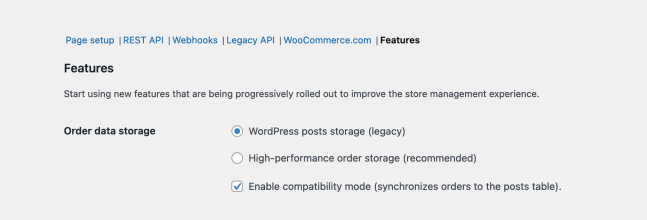
-Once synchronization has completed, you can select **WordPress posts storage (legacy)** as your preferred option. You can also disable compatibility mode at this point. Once you are ready to re-enable HPOS, simply follow the instructions posted at the [start of this doc](https://github.com/woocommerce/woocommerce/blob/trunk/docs/high-performance-order-storage/#section-3). Finally, remember to save this page between changes!
+Once synchronization has completed, you can select **WordPress posts storage (legacy)** as your preferred option. You can also disable compatibility mode at this point. Once you are ready to re-enable HPOS, simply follow the instructions posted at the [start of this doc](/docs/features/orders/high-performance-order-storage/#enabling-the-feature). Finally, remember to save this page between changes!
As noted earlier, we also strongly recommend reaching out to the support teams of any plugins that are incompatible, so they can take corrective action.
diff --git a/docs/features/orders/high-performance-order-storage/_category_.json b/docs/features/orders/high-performance-order-storage/_category_.json
new file mode 100644
index 00000000000..15d9a661da3
--- /dev/null
+++ b/docs/features/orders/high-performance-order-storage/_category_.json
@@ -0,0 +1,11 @@
+{
+ "position": 90,
+ "label": "High Performance Order Storage",
+ "description": "High Performance Order Storage (HPOS) is a new way to store orders in WooCommerce. It is designed to improve performance and scalability for stores with large numbers of orders.",
+ "collapsible": true,
+ "collapsed": true,
+ "link": {
+ "type": "doc",
+ "id": "README"
+ }
+}
diff --git a/docs/features/high-performance-order-storage/cli-tools.md b/docs/features/orders/high-performance-order-storage/cli-tools.md
similarity index 99%
rename from docs/features/high-performance-order-storage/cli-tools.md
rename to docs/features/orders/high-performance-order-storage/cli-tools.md
index facda1a2e2d..ca1e5607a0a 100644
--- a/docs/features/high-performance-order-storage/cli-tools.md
+++ b/docs/features/orders/high-performance-order-storage/cli-tools.md
@@ -1,6 +1,7 @@
---
post_title: HPOS CLI Tools
-
+sidebar_label: CLI tools
+sidebar_position: 5
---
# HPOS CLI Tools
@@ -358,4 +359,3 @@ Starting cleanup for 999 orders...
HPOS cleanup 100% [=====================================================================================================================] 0:01 / 0:05
Success: Cleanup completed for 999 orders.
```
-
diff --git a/docs/features/high-performance-order-storage/enable-hpos.md b/docs/features/orders/high-performance-order-storage/enable-hpos.md
similarity index 99%
rename from docs/features/high-performance-order-storage/enable-hpos.md
rename to docs/features/orders/high-performance-order-storage/enable-hpos.md
index da58f8d7344..0061e4fd08d 100644
--- a/docs/features/high-performance-order-storage/enable-hpos.md
+++ b/docs/features/orders/high-performance-order-storage/enable-hpos.md
@@ -1,7 +1,7 @@
---
post_title: How to enable High Performance Order Storage
sidebar_label: Enable HPOS
-
+sidebar_position: 1
---
# How to enable High Performance Order Storage
@@ -28,4 +28,3 @@ To activate High-Performance Order Storage, existing stores will first need to g
4. After both tables are successfully synchronized, you'll be able to select the option to switch to High-Performance Order Storage (HPOS).
- It is advisable to maintain compatibility mode for some time to ensure a seamless transition. In case of any issues, reverting to the post table can be done instantly.
-
diff --git a/docs/features/high-performance-order-storage/guide-large-store.md b/docs/features/orders/high-performance-order-storage/guide-large-store.md
similarity index 98%
rename from docs/features/high-performance-order-storage/guide-large-store.md
rename to docs/features/orders/high-performance-order-storage/guide-large-store.md
index 311dc8dea55..e5b412aa98d 100644
--- a/docs/features/high-performance-order-storage/guide-large-store.md
+++ b/docs/features/orders/high-performance-order-storage/guide-large-store.md
@@ -1,6 +1,7 @@
---
post_title: A large store's guide to enable HPOS on WooCommerce
sidebar_label: Enable HPOS for large stores
+sidebar_position: 2
---
# A large store's guide to enable HPOS on WooCommerce
@@ -9,8 +10,8 @@ Do you run a high-volume WooCommerce store? Are you about to embark on the task
## Before you begin
-1. [Intro to High-Performance Order Storage](/docs/features/high-performance-order-storage/)
-2. [High-Performance Order Storage Upgrade Recipe Book](/docs/features/high-performance-order-storage/recipe-book/)
+1. [Intro to High-Performance Order Storage](/docs/features/orders/high-performance-order-storage/)
+2. [High-Performance Order Storage Upgrade Recipe Book](/docs/features/orders/high-performance-order-storage/recipe-book/)
3. [High-Performance Order Storage: Backward Compatibility and Synchronization](https://developer.woocommerce.com/2022/09/29/high-performance-order-storage-backward-compatibility-and-synchronization/)
4. [Intro to High-Performance Order Storage for non-devs](https://woocommerce.com/document/high-performance-order-storage/)
@@ -138,4 +139,3 @@ Now with synchronization fully disabled, test out various critical flows, check
2. [ ] Document any issues encountered during testing and migration.
3. [ ] Regularly communicate with stakeholders regarding testing progress and outcomes.
4. [ ] Plan for potential fallback scenarios, ensuring the ability to revert to posts if issues arise.
-
diff --git a/docs/features/high-performance-order-storage/recipe-book.md b/docs/features/orders/high-performance-order-storage/recipe-book.md
similarity index 99%
rename from docs/features/high-performance-order-storage/recipe-book.md
rename to docs/features/orders/high-performance-order-storage/recipe-book.md
index af163ec8589..23f6b7d3137 100644
--- a/docs/features/high-performance-order-storage/recipe-book.md
+++ b/docs/features/orders/high-performance-order-storage/recipe-book.md
@@ -1,6 +1,7 @@
---
post_title: HPOS extension recipe book
-
+sidebar_label: Extension recipe book
+sidebar_position: 3
---
# HPOS extension recipe book
diff --git a/docs/features/high-performance-order-storage/wc-order-query-improvements.md b/docs/features/orders/high-performance-order-storage/wc-order-query-improvements.md
similarity index 96%
rename from docs/features/high-performance-order-storage/wc-order-query-improvements.md
rename to docs/features/orders/high-performance-order-storage/wc-order-query-improvements.md
index dfe1ea42cf3..5e198f00818 100644
--- a/docs/features/high-performance-order-storage/wc-order-query-improvements.md
+++ b/docs/features/orders/high-performance-order-storage/wc-order-query-improvements.md
@@ -1,11 +1,12 @@
---
post_title: HPOS order querying APIs
-
+sidebar_label: Order querying APIs
+sidebar_position: 4
---
# HPOS order querying APIs
-With the introduction of HPOS, we've enhanced the querying functionality in WC. Now, in addition to the well-known [existing APIs](/docs/extensions/core-concepts/wc-get-orders), we're adding a few features that would make it easier to create complex queries on orders or their properties, including the ability to query custom order metadata.
+With the introduction of HPOS, we've enhanced the querying functionality in WC. Now, in addition to the well-known [existing APIs](/docs/features/orders/wc-get-orders), we're adding a few features that would make it easier to create complex queries on orders or their properties, including the ability to query custom order metadata.
All the new query types are implemented as additional query arguments that can be passed to `wc_get_orders()` and are heavily inspired by similar functionality in WordPress' own `WP_Query`. As regular query arguments, they can be combined with other arguments to produce complex queries that, until now, would have required writing custom code and SQL.
diff --git a/docs/extensions/core-concepts/wc-get-orders.md b/docs/features/orders/wc-get-orders.md
similarity index 97%
rename from docs/extensions/core-concepts/wc-get-orders.md
rename to docs/features/orders/wc-get-orders.md
index c7bdfea9967..7ae664dd5cd 100644
--- a/docs/extensions/core-concepts/wc-get-orders.md
+++ b/docs/features/orders/wc-get-orders.md
@@ -1,6 +1,8 @@
---
sidebar_label: Order Querying
+sidebar_position: 1
---
+
# `wc_get_orders()` and order queries
`wc_get_orders()` and `WC_Order_Query` provide a standard way of retrieving orders from the database, similar to WordPress' [`get_posts()` and `WP_Query`](https://codex.wordpress.org/Class_Reference/WP_Query) but specifically for orders.
@@ -328,7 +330,7 @@ $orders = wc_get_orders( $args );
| --- | --- |
| **meta_query** | One or more arrays with keys `key` (meta key), `value` (optional, string or array) and optionally `type` and `compare`.<br />This parameter is analogous to [WP_Query's `meta_query`](https://developer.wordpress.org/reference/classes/wp_query/#custom-field-post-meta-parameters), supporting various comparison operators and levels of queries joined by AND/OR relations. |
-For more details and examples, refer to the [HPOS order querying](/docs/features/high-performance-order-storage/wc-order-query-improvements#metadata-queries-meta_query) guide.
+For more details and examples, refer to the [HPOS order querying](/docs/features/orders/high-performance-order-storage/wc-order-query-improvements#metadata-queries-meta_query) guide.
:::warning
@@ -367,7 +369,7 @@ $orders = wc_get_orders(
|-|-|
|**field_query**|One or more arrays with keys `field` (any order property), `value` and optionally `type` and `compare`.<br />This parameter is analogous to those of `meta_query` described in the previous section, supporting various comparison operators and levels of queries joined by AND/OR relations.|
-For more details and examples, refer to the [HPOS order querying](/docs/features/high-performance-order-storage/wc-order-query-improvements#order-field-queries-field_query) guide.
+For more details and examples, refer to the [HPOS order querying](/docs/features/orders/high-performance-order-storage/wc-order-query-improvements#order-field-queries-field_query) guide.
:::warning
@@ -405,7 +407,7 @@ $orders = wc_get_orders(
| --- | --- |
| **date_query** | One or more arrays with keys `column` (an order date: `date_completed`, `date_created`, `date_updated` or `date_paid`, optionally followed by `_gmt` for UTC dates), `value` and optionally `type` and `compare`.<br />This parameter is analogous to [WP_Query's `date_query`](https://developer.wordpress.org/reference/classes/wp_query/#date-parameters), supporting various comparison operators and levels of queries joined by AND/OR relations. |
-For more details and examples, refer to the [HPOS order querying](/docs/features/high-performance-order-storage/wc-order-query-improvements#date-queries-date_query) guide.
+For more details and examples, refer to the [HPOS order querying](/docs/features/orders/high-performance-order-storage/wc-order-query-improvements#date-queries-date_query) guide.
:::warning
diff --git a/docs/features/payments/_category_.json b/docs/features/payments/_category_.json
index 94a9418dd6a..628bdba9b17 100644
--- a/docs/features/payments/_category_.json
+++ b/docs/features/payments/_category_.json
@@ -1,6 +1,11 @@
{
- "position": 1,
+ "position": 3,
"label": "Payments",
"collapsible": true,
- "collapsed": true
-}
\ No newline at end of file
+ "collapsed": true,
+ "link": {
+ "type": "generated-index",
+ "title": "Payments",
+ "slug": "/features/payments"
+ }
+}
diff --git a/docs/features/payments/payment-gateway-api.md b/docs/features/payments/payment-gateway-api.md
index d40f3c25660..393388b94ba 100644
--- a/docs/features/payments/payment-gateway-api.md
+++ b/docs/features/payments/payment-gateway-api.md
@@ -1,7 +1,7 @@
---
post_title: WooCommerce Payment Gateway API
sidebar_label: Payment Gateway API
-
+sidebar_position: 1
---
# WooCommerce Payment Gateway API
diff --git a/docs/features/payments/payment-gateway-plugin-base.md b/docs/features/payments/payment-gateway-plugin-base.md
index 938ec95f77b..55b62475891 100644
--- a/docs/features/payments/payment-gateway-plugin-base.md
+++ b/docs/features/payments/payment-gateway-plugin-base.md
@@ -1,6 +1,7 @@
---
post_title: WooCommerce payment gateway plugin base
-
+sidebar_label: Payment gateway plugin base
+sidebar_position: 2
---
# WooCommerce payment gateway plugin base
diff --git a/docs/features/payments/payment-token-api.md b/docs/features/payments/payment-token-api.md
index 736bfcc3a54..b25eb92414b 100644
--- a/docs/features/payments/payment-token-api.md
+++ b/docs/features/payments/payment-token-api.md
@@ -1,7 +1,7 @@
---
post_title: WooCommerce Payment Token API
sidebar_label: Payment Token API
-
+sidebar_position: 3
---
# WooCommerce Payment Token API
diff --git a/docs/user-experience-guidelines/ux-guidelines-payments/README.md b/docs/features/payments/ux-guidelines/README.md
similarity index 100%
rename from docs/user-experience-guidelines/ux-guidelines-payments/README.md
rename to docs/features/payments/ux-guidelines/README.md
diff --git a/docs/features/payments/ux-guidelines/_category_.json b/docs/features/payments/ux-guidelines/_category_.json
new file mode 100644
index 00000000000..f453a050f89
--- /dev/null
+++ b/docs/features/payments/ux-guidelines/_category_.json
@@ -0,0 +1,11 @@
+{
+ "position": 90,
+ "label": "UX guidelines",
+ "description": "UX guidelines for payments in WooCommerce.",
+ "collapsible": true,
+ "collapsed": true,
+ "link": {
+ "type": "doc",
+ "id": "README"
+ }
+}
diff --git a/docs/user-experience-guidelines/ux-guidelines-payments/payment-button-layout.md b/docs/features/payments/ux-guidelines/payment-button-layout.md
similarity index 98%
rename from docs/user-experience-guidelines/ux-guidelines-payments/payment-button-layout.md
rename to docs/features/payments/ux-guidelines/payment-button-layout.md
index 4c6747ad8d8..65490aa232d 100644
--- a/docs/user-experience-guidelines/ux-guidelines-payments/payment-button-layout.md
+++ b/docs/features/payments/ux-guidelines/payment-button-layout.md
@@ -1,6 +1,7 @@
---
post_title: Payment button layout
sidebar_label: Payment button layout
+sidebar_position: 4
---
# Payment Button Layout
diff --git a/docs/user-experience-guidelines/ux-guidelines-payments/payment-button-size.md b/docs/features/payments/ux-guidelines/payment-button-size.md
similarity index 99%
rename from docs/user-experience-guidelines/ux-guidelines-payments/payment-button-size.md
rename to docs/features/payments/ux-guidelines/payment-button-size.md
index ed47fc24c59..ef90a105f27 100644
--- a/docs/user-experience-guidelines/ux-guidelines-payments/payment-button-size.md
+++ b/docs/features/payments/ux-guidelines/payment-button-size.md
@@ -1,6 +1,7 @@
---
post_title: Payment button size
sidebar_label: Payment button size
+sidebar_position: 2
---
# Payment Button Size and Anatomy
diff --git a/docs/user-experience-guidelines/ux-guidelines-payments/payment-button-style.md b/docs/features/payments/ux-guidelines/payment-button-style.md
similarity index 98%
rename from docs/user-experience-guidelines/ux-guidelines-payments/payment-button-style.md
rename to docs/features/payments/ux-guidelines/payment-button-style.md
index 7ce4f5f1d1c..9bc39068ad0 100644
--- a/docs/user-experience-guidelines/ux-guidelines-payments/payment-button-style.md
+++ b/docs/features/payments/ux-guidelines/payment-button-style.md
@@ -1,6 +1,7 @@
---
post_title: Payment button style
sidebar_label: Payment button style
+sidebar_position: 3
---
# Payment Button Style
diff --git a/docs/user-experience-guidelines/ux-guidelines-payments/payments-onboarding.md b/docs/features/payments/ux-guidelines/payments-onboarding.md
similarity index 99%
rename from docs/user-experience-guidelines/ux-guidelines-payments/payments-onboarding.md
rename to docs/features/payments/ux-guidelines/payments-onboarding.md
index 128d617babf..a996c4c9418 100644
--- a/docs/user-experience-guidelines/ux-guidelines-payments/payments-onboarding.md
+++ b/docs/features/payments/ux-guidelines/payments-onboarding.md
@@ -1,6 +1,7 @@
---
post_title: Payments onboarding and setup
sidebar_label: Payments onboarding and setup
+sidebar_position: 1
---
# Payments Onboarding and Setup
diff --git a/docs/features/products/_category_.json b/docs/features/products/_category_.json
new file mode 100644
index 00000000000..baf1ec9b28a
--- /dev/null
+++ b/docs/features/products/_category_.json
@@ -0,0 +1,11 @@
+{
+ "position": 1,
+ "label": "Products",
+ "collapsible": true,
+ "collapsed": true,
+ "link": {
+ "type": "generated-index",
+ "title": "Products",
+ "slug": "/features/products"
+ }
+}
diff --git a/docs/extensions/settings-and-config/using-custom-attributes-in-menus.md b/docs/features/products/using-custom-attributes-in-menus.md
similarity index 98%
rename from docs/extensions/settings-and-config/using-custom-attributes-in-menus.md
rename to docs/features/products/using-custom-attributes-in-menus.md
index f2e7a956ffc..57970a9bdf5 100644
--- a/docs/extensions/settings-and-config/using-custom-attributes-in-menus.md
+++ b/docs/features/products/using-custom-attributes-in-menus.md
@@ -1,7 +1,7 @@
---
post_title: Managing custom attributes in WooCommerce menus and taxonomy archives
sidebar_label: Custom attributes in menus
-
+sidebar_position: 2
---
# Managing custom attributes in WooCommerce menus and taxonomy archives
diff --git a/docs/extensions/core-concepts/wc-get-products.md b/docs/features/products/wc-get-products.md
similarity index 99%
rename from docs/extensions/core-concepts/wc-get-products.md
rename to docs/features/products/wc-get-products.md
index 4c84b63475d..75d2d8034ee 100644
--- a/docs/extensions/core-concepts/wc-get-products.md
+++ b/docs/features/products/wc-get-products.md
@@ -1,6 +1,7 @@
---
post_title: wc_get_products and product queries
sidebar_label: Product Querying
+sidebar_position: 1
---
# `wc_get_products` and product queries
diff --git a/docs/features/shipping/_category_.json b/docs/features/shipping/_category_.json
index c0a758ac8c3..5c489f3ec81 100644
--- a/docs/features/shipping/_category_.json
+++ b/docs/features/shipping/_category_.json
@@ -1,6 +1,11 @@
{
- "position": 2,
+ "position": 4,
"label": "Shipping",
"collapsible": true,
- "collapsed": true
- }
\ No newline at end of file
+ "collapsed": true,
+ "link": {
+ "type": "generated-index",
+ "title": "Shipping",
+ "slug": "/features/shipping"
+ }
+}
diff --git a/docs/features/shipping/shipping-method-api.md b/docs/features/shipping/shipping-method-api.md
index 2d08cfdab6c..b87ff3eb84d 100644
--- a/docs/features/shipping/shipping-method-api.md
+++ b/docs/features/shipping/shipping-method-api.md
@@ -1,7 +1,7 @@
---
post_title: Shipping method API
sidebar_label: Shipping method API
-
+sidebar_position: 1
---
# Shipping method API
diff --git a/docs/theming/theme-design.md b/docs/theming/theme-design.md
new file mode 100644
index 00000000000..6ac68034d30
--- /dev/null
+++ b/docs/theming/theme-design.md
@@ -0,0 +1,93 @@
+---
+sidebar_label: UX guidelines
+sidebar_position: 3
+category_slug: user-experience-themes
+post_title: Theme design guidelines
+---
+
+# Theme design guidelines
+
+This page covers general guidelines and best practices to follow so your theme experience aligns with ecommerce industry standards and WooCommerce. A strong theme design should support a great online shopping experience, maximize sales, remain easy to use, integrate cleanly, and encourage strong UX adoption.
+
+We recommend you review the [UI best practices for WordPress](https://developer.wordpress.org/themes/advanced-topics/ui-best-practices/) to ensure your theme is aligned with the WordPress theme requirements.
+
+Make sure your theme fits one or more industries currently available in the [WooCommerce themes store](https://woocommerce.com/product-category/themes). The theme should offer enough originality and distinctiveness in its design, while keeping it familiar, to be distinguished from other themes on the WooCommerce theme store. Your theme should avoid copying existing themes on the WooCommerce theme store or other WordPress theme marketplaces.
+
+## Design
+
+High-quality design is an important aspect of an online store, and that is driven by the theme design and content. The design of the theme should be simple, consistent, uncluttered, memorable, intuitive, efficient, and functional. When designing a new theme for WooCommerce, pay special attention to the following areas.
+
+### Layout
+
+The theme should be up to industry standards in terms of hierarchy, flow, content balance, and white space.
+
+Theme authors must ensure that store pages, such as shop, product page, categories, cart, checkout, and profile pages, fit seamlessly with the theme since they are the central point of a WooCommerce theme.
+
+The theme is expected to be fully functional and optimized for common device types such as laptops, tablets, and smartphones.
+
+### Typography
+
+The theme should provide elegant and legible font pairings that promote a comfortable reading experience.
+
+Consistent and harmonious font sizes, line widths, and spacing must be employed across all pages and device types.
+
+The theme typography must consist of a small number of typefaces that complement each other, generally no more than two.
+
+Use proper capitalization, avoiding all caps with the exception of some UI elements such as buttons and tabs.
+
+### Iconography
+
+Icons used in the theme should portray a direct meaning of the actions or situations they represent and be used consistently regarding sizing, positioning, and color.
+
+### Color
+
+The theme must follow a harmonious and consistent color scheme across UI elements and all pages. The color scheme should consist of a small number of colors that contain:
+
+- A primary or accent dominant color
+- One or two secondary colors that complement the primary color
+- Neutral colors, such as white, black, and gray
+
+The color palette used in text and graphical UI components must be compliant with the [WCAG AA conformance level](https://www.w3.org/TR/WCAG20/#conformance) or above.
+
+### Patterns
+
+The theme must employ a consistent set of patterns that are used across pages, such as:
+
+- Navigation, sidebars, and footer
+- Content blocks, such as titles, paragraphs, lists, product details, reviews, and image showcases
+- Forms structure and elements, such as fields, drop-downs, and buttons
+- Tables
+- Lists
+- Notices
+
+## Accessibility
+
+Your theme must meet the [WordPress Accessibility Coding Standards](https://developer.wordpress.org/coding-standards/wordpress-coding-standards/accessibility/).
+
+For more information on accessibility, check out the [WordPress accessibility quick start guide](https://make.wordpress.org/accessibility/handbook/best-practices/quick-start-guide/).
+
+## Branding
+
+The theme must not contain any branding or references to theme authors in locations that interfere with the normal operation of an online store. Theme authors can include links to their websites on the theme footer. Affiliate linking is not permitted.
+
+The interface should solely focus on the experience. The usage of notices, banners, large logos, or any promotional materials is not allowed in the admin interface.
+
+## Customization
+
+> This section applies to development of non-block themes only. For more specific guidance on development of block themes, refer to the [WordPress Developer's Guide to Block Themes](https://learn.wordpress.org/course/a-developers-guide-to-block-themes-part-1/).
+
+Themes have to rely on the customizer for any type of initial setup. Specific onboarding flows are not permitted.
+
+Any customization supported by the theme, such as layout options, additional features, block options, etc, should be delivered in the customizer or on block settings for blocks that are included in the theme.
+
+Themes should not bundle or require the installation of additional plugins/extensions or frameworks that provide additional options or functionality. For more information on customization, check out the [WordPress theme customization API](https://codex.wordpress.org/Theme_Customization_API).
+
+On activation, themes shouldn't override the WordPress theme activation flow by taking the user into other pages.
+
+## Demos and sample content
+
+Upon submission, theme authors must provide a way for the theme to be showcased and tested. The sample content or demo should refrain from using custom graphics or assets that will not be present in the deliverables to avoid merchant confusion and broken expectations, such as using logos or illustrations. When creating a theme for a specific vertical, theme authors should consider using sample content that aligns with the vertical.
+
+All imagery and text should be appropriate for all ages and family-friendly. The theme author should consider using imagery that is inclusive of ages, nationalities, etc. The theme should refrain from using imagery that looks like stock photography.
+
+The theme must be distributed and cleared of all the necessary licenses for assets such as images, fonts, icons, etc.
diff --git a/docs/user-experience-guidelines/_category_.json b/docs/user-experience-guidelines/_category_.json
deleted file mode 100644
index fd037100d2a..00000000000
--- a/docs/user-experience-guidelines/_category_.json
+++ /dev/null
@@ -1,4 +0,0 @@
-{
- "position": 6,
- "label": "UX guidelines"
-}
\ No newline at end of file
diff --git a/docs/user-experience-guidelines/ux-guidelines-themes/README.md b/docs/user-experience-guidelines/ux-guidelines-themes/README.md
deleted file mode 100644
index 4d2a55edf37..00000000000
--- a/docs/user-experience-guidelines/ux-guidelines-themes/README.md
+++ /dev/null
@@ -1,13 +0,0 @@
----
-sidebar_label: Theme design
-category_slug: user-experience-themes
-post_title: Theme design guidelines
----
-
-# Theme Design guidelines
-
-This section covers general guidelines and best practices to follow in order to ensure your theme experience aligns with ecommerce industry standards and WooCommerce for providing a great online shopping experience, maximizing sales, ensuring ease of use, seamless integration, and strong UX adoption.
-
-We recommend you review the [UI best practices for WordPress](https://developer.wordpress.org/themes/advanced-topics/ui-best-practices/) to ensure your theme is aligned with the WordPress theme requirements.
-
-Make sure your theme fits one or more industries currently available in the [WooCommerce themes store](https://woocommerce.com/product-category/themes). It's important that the theme offers enough originality and distinctiveness in its design, while keeping it familiar, in order to be distinguished from other themes on the WooCommerce theme store. Your theme should avoid copying existing themes on the WooCommerce theme store or other WordPress theme marketplaces.
diff --git a/docs/user-experience-guidelines/ux-guidelines-themes/theme-accessibility.md b/docs/user-experience-guidelines/ux-guidelines-themes/theme-accessibility.md
deleted file mode 100644
index 00e676512e9..00000000000
--- a/docs/user-experience-guidelines/ux-guidelines-themes/theme-accessibility.md
+++ /dev/null
@@ -1,10 +0,0 @@
----
-post_title: Accessibility
-sidebar_label: Accessibility
----
-
-# Accessibility
-
-Your theme must meet the [WordPress Accessibility Coding Standards](https://developer.wordpress.org/coding-standards/wordpress-coding-standards/accessibility/)
-
-For more information on accessibility, check out the [WordPress accessibility quick start guide](https://make.wordpress.org/accessibility/handbook/best-practices/quick-start-guide/).
diff --git a/docs/user-experience-guidelines/ux-guidelines-themes/theme-branding.md b/docs/user-experience-guidelines/ux-guidelines-themes/theme-branding.md
deleted file mode 100644
index 08b98e4da8f..00000000000
--- a/docs/user-experience-guidelines/ux-guidelines-themes/theme-branding.md
+++ /dev/null
@@ -1,10 +0,0 @@
----
-post_title: Branding
-sidebar_label: Branding
----
-
-# Branding
-
-The theme must not contain any branding or references to theme authors in locations that interfere with the normal operation of an online store. Theme authors can include links to their websites on the theme footer. Affiliate linking is not permitted.
-
-The interface should solely focus on the experience, the usage of notices, banners, large logos, or any promotional materials is not allowed in the admin interface.
diff --git a/docs/user-experience-guidelines/ux-guidelines-themes/theme-customization.md b/docs/user-experience-guidelines/ux-guidelines-themes/theme-customization.md
deleted file mode 100644
index 3ddeed53ff7..00000000000
--- a/docs/user-experience-guidelines/ux-guidelines-themes/theme-customization.md
+++ /dev/null
@@ -1,16 +0,0 @@
----
-post_title: Customization
-sidebar_label: Customization
----
-
-# Customization
-
-> This page of the guidelines applies to development of non-block themes only. For more specific guidance on development of block themes, refer to the [WordPress Developer's Guide to Block Themes](https://learn.wordpress.org/course/a-developers-guide-to-block-themes-part-1/).
-
-Themes have to rely on the customizer for any type of initial set up. Specific onboarding flows are not permitted.
-
-Any customization supported by the theme, such as layout options, additional features, block options, etc, should be delivered in the customizer or on block settings for blocks that are included in the theme.
-
-Themes should not bundle or require the installation of additional plugins/extensions (or frameworks) that provide additional options or functionality. For more information on customisation, check out the [WordPress theme customization API](https://codex.wordpress.org/Theme_Customization_API).
-
-On activation, themes shouldn't override the WordPress theme activation flow by taking the user into other pages.
diff --git a/docs/user-experience-guidelines/ux-guidelines-themes/theme-demos-and-sample-content.md b/docs/user-experience-guidelines/ux-guidelines-themes/theme-demos-and-sample-content.md
deleted file mode 100644
index 4467d371ecb..00000000000
--- a/docs/user-experience-guidelines/ux-guidelines-themes/theme-demos-and-sample-content.md
+++ /dev/null
@@ -1,12 +0,0 @@
----
-post_title: Demos and sample content
-sidebar_label: Demos and sample content
----
-
-# Demos and Sample Content
-
-Upon submission theme authors must provide a way for the theme to be showcased and tested. The sample content/demo should refrain from using custom graphics/assets that will not be present in the deliverables to avoid merchant confusion and broken expectations (examples: using logos, illustrations). When creating a theme for a specific vertical theme authors should consider using sample content that aligns with the vertical.
-
-All imagery and text should be appropriate for all ages/family-friendly. The theme author should consider using imagery that is inclusive of ages, nationalities, etc. The theme should refrain from using imagery that looks like 'stock photography'.
-
-The theme must be distributed and cleared of all the necessary licenses for assets such as images, fonts, icons, etc.
diff --git a/docs/user-experience-guidelines/ux-guidelines-themes/theme-design.md b/docs/user-experience-guidelines/ux-guidelines-themes/theme-design.md
deleted file mode 100644
index 829b8257ce1..00000000000
--- a/docs/user-experience-guidelines/ux-guidelines-themes/theme-design.md
+++ /dev/null
@@ -1,51 +0,0 @@
----
-post_title: Branding
-sidebar_label: Branding
----
-
-# Branding
-
-High-quality design is an important aspect of an online store, and that is driven by the theme design and content. The design of the theme should be simple, consistent, uncluttered, memorable, intuitive, efficient, and functional. When designing a new theme for WooCommerce special attention should be given to:
-
-## Layout
-
-The theme should be up to industry standards in terms of hierarchy, flow, content balance, and white space.
-
-Theme authors must ensure that store pages (shop, product page, categories, cart, checkout, profile page, etc) fit seamlessly with the theme since they are the central point of a WooCommerce theme.
-
-The Theme is expected to be fully functional and optimized to be accessed on common device types such as laptops, tablets, and smartphones.
-
-## Typography
-
-The theme should provide elegant and legible font pairings that promote a comfortable reading experience.
-
-Consistent and harmonious font sizes, line widths and spacing must be employed across all pages and device types.
-
-The theme typography must consist of a small number of typefaces that complement each other, generally no more than two.
-
-Proper capitalization is used, avoiding all caps (with the exception of some UI elements such as buttons, tabs, etc).
-
-## Iconography
-
-Icons used in the theme portray a direct meaning of the actions/situations they are representing and are used consistently regarding sizing positioning and color.
-
-## Color
-
-The theme must follow a harmonious and consistent color scheme across UI elements and all pages. The color scheme should consist of small number of colors that contain:
-
-- A primary/accent dominant color
-- One or two secondary colors that complement the primary
-- Neutral colors (white, black, gray)
-
-The color palette used in text and graphical UI components must be compliant with the [WCAG AA conformance level](https://www.w3.org/TR/WCAG20/#conformance) or above.
-
-## Patterns
-
-The theme must employ a consistent set of patterns that are used across pages, such as:
-
-- Navigation, sidebars, footer
-- Content blocks (titles, paragraphs, lists, product details, reviews, image showcases, etc)
-- Forms structure and elements (fields, drop-downs, buttons, etc)
-- Tables
-- Lists
-- Notices
diff --git a/docs/wc-cli/wc-cli-commands/README.md b/docs/wc-cli/wc-cli-commands/README.md
index c8043568f07..588d321b96b 100644
--- a/docs/wc-cli/wc-cli-commands/README.md
+++ b/docs/wc-cli/wc-cli-commands/README.md
@@ -32,7 +32,7 @@ wp wc [command] --help
| [wc com](/docs/wc-cli/wc-cli-commands/wc-com/) | Interacts with extensions from the WooCommerce.com marketplace via CLI. |
| [wc customer](/docs/wc-cli/wc-cli-commands/wc-customer/) | Manage WooCommerce customer resources. |
| [wc customer_download](/docs/wc-cli/wc-cli-commands/wc-customer-download/) | Manage WooCommerce customer download resources. |
-| [wc hpos](/docs/wc-cli/wc-cli-commands/wc-hpos/) | Commands for managing High-Performance Order Storage (HPOS). For detailed examples, see [HPOS CLI tools](/docs/features/high-performance-order-storage/cli-tools/). |
+| [wc hpos](/docs/wc-cli/wc-cli-commands/wc-hpos/) | Commands for managing High-Performance Order Storage (HPOS). For detailed examples, see [HPOS CLI tools](/docs/features/orders/high-performance-order-storage/cli-tools/). |
| [wc order_note](/docs/wc-cli/wc-cli-commands/wc-order-note/) | Manage WooCommerce order note resources. |
| [wc palt](/docs/wc-cli/wc-cli-commands/wc-palt/) | Commands for managing the product attributes lookup table. The table stores denormalized product attribute term data used to speed up catalog filtering. |
| [wc payment_gateway](/docs/wc-cli/wc-cli-commands/wc-payment-gateway/) | Manage WooCommerce payment gateway resources. |
diff --git a/docs/wc-cli/wc-cli-commands/wc-hpos.md b/docs/wc-cli/wc-cli-commands/wc-hpos.md
index 5b91a6c1bb2..8dc50901b68 100644
--- a/docs/wc-cli/wc-cli-commands/wc-hpos.md
+++ b/docs/wc-cli/wc-cli-commands/wc-hpos.md
@@ -3,7 +3,7 @@ title: wc hpos
sidebar_label: wc hpos
---
-Commands for managing High-Performance Order Storage (HPOS). For detailed examples, see [HPOS CLI tools](/docs/features/high-performance-order-storage/cli-tools/).
+Commands for managing High-Performance Order Storage (HPOS). For detailed examples, see [HPOS CLI tools](/docs/features/orders/high-performance-order-storage/cli-tools/).
The older `wc cot` namespace is deprecated. Use `wc hpos` instead of the remaining deprecated aliases: `wc cot count_unmigrated`, `wc cot sync`, `wc cot verify_cot_data`, `wc cot enable`, and `wc cot disable`. The `wc cot migrate` command is fully deprecated and no longer works.
diff --git a/docs/woo-marketplace/submitting-your-product.mdx b/docs/woo-marketplace/submitting-your-product.mdx
index 64666670082..f71167433e9 100644
--- a/docs/woo-marketplace/submitting-your-product.mdx
+++ b/docs/woo-marketplace/submitting-your-product.mdx
@@ -50,7 +50,7 @@ PHP 7.4 reached [End of Life](https://www.php.net/supported-versions.php) (EOL)
- The product review includes a deeper analysis of the product's user experience (UX) and user interface (UI).
- Ensure that your product's [critical flows](https://developer.woocommerce.com/testing-extensions-and-maintaining-quality-code/critical-flows/) have been thoroughly tested. See an example of [critical flows in the core WooCommerce plugin](/docs/contribution/testing/core-critical-flows/).
- Extensions must adhere to [development best practices](/docs/extensions/best-practices-extensions/extension-development-best-practices/) and [UX guidelines](/docs/extensions/ux-guidelines-extensions/).
-- Themes must adhere to [design](/docs/theming/theme-development/theme-design-ux-guidelines/), and [UX guidelines](/docs/user-experience-guidelines/ux-guidelines-themes/). If you are submitting a block theme, also review [theme development](/docs/theming/block-theme-development/theming-woo-blocks/).
+- Themes must adhere to [design](/docs/theming/theme-development/theme-design-ux-guidelines/), and [UX guidelines](/docs/theming/theme-design/). If you are submitting a block theme, also review [theme development](/docs/theming/block-theme-development/theming-woo-blocks/).
- **Accessibility**: It is important that all customers can use the stores where your extension is installed. Extension submissions must meet the [WordPress Accessibility Coding Standards](https://developer.wordpress.org/coding-standards/wordpress-coding-standards/accessibility/). For more information, review WordPress's [accessibility quick start guide](https://make.wordpress.org/accessibility/handbook/best-practices/quick-start-guide/).
- Does the product have a single core purpose and use WooCommerce features as much as possible?
- Can the product function "out of the box" without much configuration?
@@ -97,7 +97,7 @@ As we evolve within the WordPress ecosystem, we're placing a strong emphasis on
High-Performance Order Storage (HPOS) is the **default experience for new WooCommerce stores**. It moves order data from the WordPress post and postmeta tables to dedicated order tables to improve scalability and reliability.
:::info
-**All new extension submissions must be HPOS-compatible.** View our [HPOS recipe book](/docs/features/high-performance-order-storage/recipe-book/) for ways to support HPOS in your product.
+**All new extension submissions must be HPOS-compatible.** View our [HPOS recipe book](/docs/features/orders/high-performance-order-storage/recipe-book/) for ways to support HPOS in your product.
:::
</details>